

Beyond the Antivirus: Why You Need Deep PDF Forensics
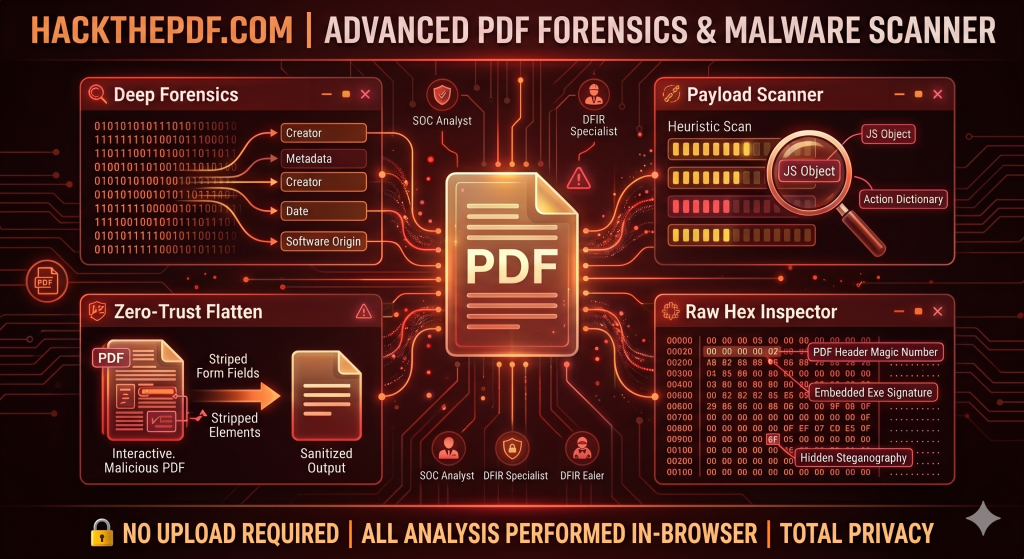
In the world of cybersecurity, the humble PDF is often a “Trojan Horse.” We trust them for invoices, resumes, and contracts, but beneath the surface of a standard .pdf file lies a complex architecture that threat actors have learned to exploit with surgical precision.
At HackThePDF, we believe that visibility is the first line of defense. Here is a look at why standard scanning isn’t enough and how our toolkit helps you dissect threats in real-time.
1. The Danger of Embedded Payloads
Most users think of a PDF as a static image of a document. In reality, the PDF specification allows for powerful interactive elements, including JavaScript and Action Dictionaries.
A malicious PDF can be configured to execute a script the moment the file is opened (OpenAction). These scripts can reach out to external servers, download secondary payloads, or exploit vulnerabilities in your PDF reader.
How HackThePDF helps: Our Payload Scanner performs a heuristic byte-scan to identify these hidden scripts before they have a chance to run.
2. Metadata: The Digital Paper Trail
Every PDF carries a “digital fingerprint.” Metadata can reveal the software used to create the file, the original author’s username, and even the exact timestamps of creation and modification. For investigators and Red Teamers, this is gold.
The Privacy Risk: If you are sending sensitive documents, you might be accidentally leaking your internal directory structure or software versions that are vulnerable to N-day exploits.
How HackThePDF helps: Our Deep Forensics module extracts every scrap of EXIF and structural metadata, giving you a full view of the file’s history.
3. The “Zero-Trust” Approach to Documents
If you receive a file from an untrusted source, scanning it isn’t always enough—sometimes you need to neutralize it.
Zero-Trust Flattening is the process of stripping away the “programmable” parts of a PDF. By destroying AcroForms, embedded media, and interactive layers, you are left with a flat, static document that is visually identical but functionally inert. It is the digital equivalent of “disarming” a package before opening it.
4. Why Local Processing Matters
Privacy is the core of HackThePDF. Most online PDF tools require you to upload your file to their cloud. This creates a massive privacy hole:
- What happens to your data after the scan?
- Who has access to the server logs?
- Is your confidential invoice now sitting in a third-party database?
HackThePDF processes everything in-browser. Using client-side JavaScript, the analysis happens on your CPU. Your files never leave your machine, ensuring 100% data exfiltration protection.
5. Reverse Engineering with the Hex Inspector
For the digital forensics (DFIR) specialist, seeing the rendered document isn’t enough. You need to see the raw binary.
The Raw Hex Inspector allows you to verify “Magic Numbers” (the file signature) to ensure a .pdf isn’t actually a renamed .exe. It lets you hunt for steganography—hidden data tucked away in the file’s non-rendered sections.
Conclusion
Security is not a product; it is a process of constant verification. Whether you are a security researcher, a lawyer handling sensitive discovery, or a curious user, HackThePDF provides the professional-grade tools you need to inspect, sanitize, and secure your digital workflow.
Ready to inspect your first payload?